An HTTP status code is a server response to a browser’s request. When you visit a website, your browser
sends a request to the site’s server, and the server then responds to the browser’s request with a
three-digit code: the HTTP status code.
These status codes are the Internet equivalent of a conversation between your browser and the server. They
communicate whether things between the two are A-okay, touch-and-go, or whether something is wrong.
Understanding status codes and how to use them will help you to diagnose site errors quickly to minimize
downtime on your site. You can even use some of these status codes to help search engines and people access
your site; a 301 redirect, for example, will tell bots and people that a page that has moved somewhere else
permanently.
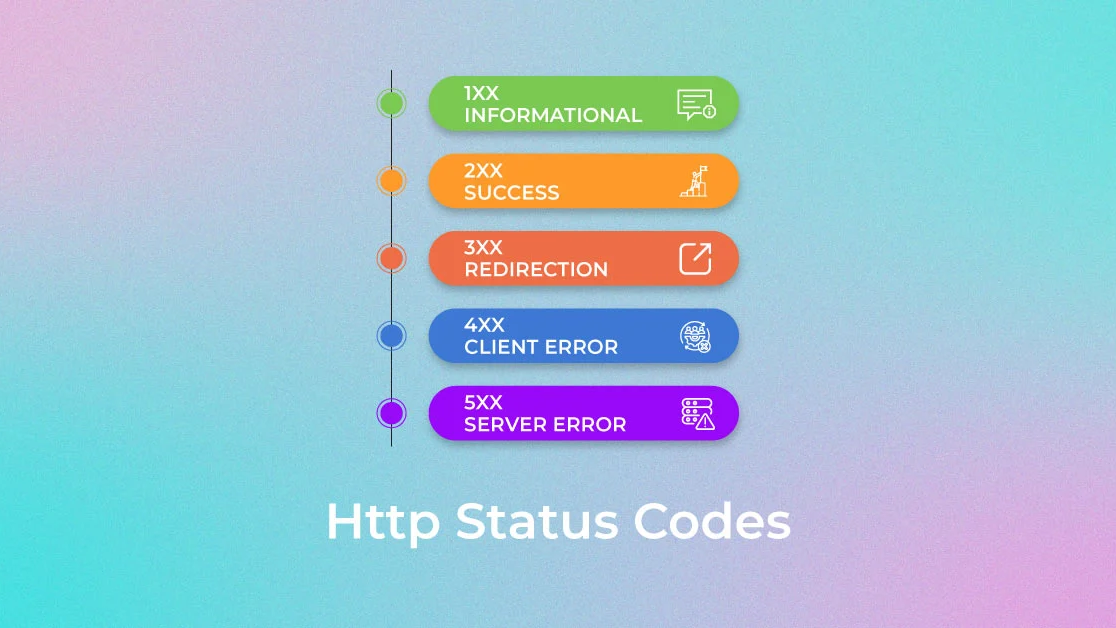
The first digit of each three-digit status code begins with one of five numbers, 1 through 5; you may see
this expressed as 1xx or 5xx to indicate status codes in that range. Each of those ranges encompasses a
different class of server response.
Common Http Status Code Classes:
1xxs – Informational responses: The server is thinking through the request.
2xxs – Success! The request was successfully completed and the server gave the browser the expected
response.
3xxs – Redirection: You got redirected somewhere else. The request was received, but there’s a
redirect of some kind.
4xxs – Client errors: Page not found. The site or page couldn’t be reached. (The request was made,
but the page isn’t valid — this is an error on the website’s side of the conversation and often appears when
a page doesn’t exist on the site.)
5xxs – Server errors: Failure. A valid request was made by the client but the server failed to
complete the request.
HTTP Status Code 200 - OK
This is your ideal status code for your normal, everyday, properly functioning page. Visitors, bots, and link equity pass through linked pages like a dream. You don’t need to do anything and you can happily go about your day secure in the knowledge that everything is just as it should be.
HTTP Status Code 301 - Permanent Redirect
A 302 redirect is similar to a 301 in that visitors and bots are passed to the new page, but link equity may not be passed along. We do not recommend using 302 redirects for permanent changes. Using 302s will cause search engine crawlers to treat the redirect as temporary, meaning that it may not pass along the link equity that the magical 301 does.
HTTP Status Code 404 - Not Found
This means the file or page that the browser is requesting wasn’t found by the server. 404s don’t indicate whether the missing page or resource is missing permanently or only temporarily. You can see what this looks like on your site by typing in a URL that doesn't exist. It’s like hitting a brick wall. Just as you’ve experienced, your visitors will hit a page that has a 404 error and either try again (if you’re lucky) or wander away to another site that has the information they’re seeking.
HTTP Status Code 410 - Gone
A 410 is more permanent than a 404; it means that the page is gone. The page is no longer available from the server and no forwarding address has been set up. Any links you have on your site that are pointing to a 410 page are sending bots and visitors to a dead resource, so if you see them, remove any references or links to them from your content.
HTTP Status Code 500 - Internal Server Error
Instead of the problem being with pages missing or not found, this status code indicates a problem with the server. A 500 is a classic server error and will affect access to your site. Human visitors and bots alike will be lost, and your link equity will go nowhere fast. Search engines prefer sites that are well maintained, so you’ll want to investigate these status codes and get these fixed as soon as you encounter them.
Related Posts
6 Reasons Why You Need a Website
In today’s connected world, a website is more than an online presence—it’s your brand’s foundation. It builds trust, attracts customers, and keeps your business competitive in the digital marketplace...
Difference Between Website and Web App
Websites share information and build presence, while web apps engage users with interactive features. Knowing the difference helps businesses choose the right digital solution for growth and efficiency...
What Soft And Hard Skills Are Needed To Become A Full Stack Developer?
Full stack developers thrive on balance—combining technical mastery with human skills. From coding languages to communication, these soft and hard skills shape success in modern digital innovation...
Difference Between WordPress Website and HTML Website
Choosing between WordPress and HTML means weighing flexibility against control. Discover how these two website approaches differ in customization, scalability, and ease—helping you pick the right path for growth...
10 Best and Profitable Tech Businesses To Start This Year
Tech entrepreneurship thrives on innovation and demand. These 10 profitable business ideas reveal opportunities in software, AI, e‑commerce, and beyond—empowering you to launch ventures that succeed this year...
Web Design - How to Start
Web design begins with vision—transforming ideas into digital experiences. Define purpose, plan structure, choose tools, and craft user‑friendly designs that connect, inspire, and build trust online....
Comments
Recent thoughts from readers and visitors.
No comments yet. Be the first to share your thoughts.
 Need Help?